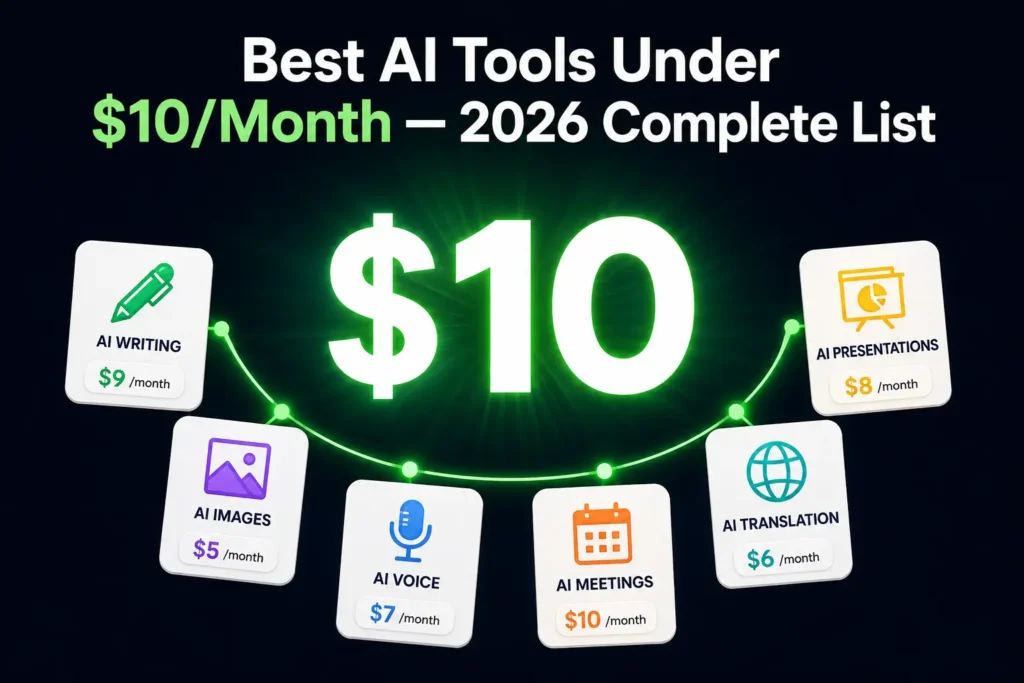
Most people assume AI tools worth using cost at least $20 a month. That assumption is quietly wrong. In 2026, a growing number of legitimate AI platforms covering writing, image generation, voice, meetings, and translation have functional paid tiers that cost less than a streaming subscription. The problem isn’t availability. It’s knowing which AI tools under $10 per month are actually useful versus which ones lock every meaningful feature behind a pricier upgrade the moment you log in.
The best AI tools under $10 per month in 2026 include Rytr for AI writing ($9/month), ElevenLabs Starter for voice synthesis ($5/month), Otter.ai Pro for meeting transcription ($8.33/month billed annually), Midjourney Basic for image generation ($10/month), and Gamma.app for AI presentations ($8/month billed annually). Each offers a genuinely functional paid tier without requiring a premium upgrade for everyday professional tasks.
This guide covers every major category with real usage limits, not just price tags, so you can stop guessing and start building.
Using this tool? Got questions?
Ask me anything on Telegram - free honest answers before you spend your money.
What Makes an AI Tool Under $10 Actually Worth It?
Price alone doesn’t make a tool good. A $9/month plan that caps you at 10,000 words and locks every advanced feature behind a $49/month upgrade is not a deal it’s a demo with a paywall.
When reviewing tools for this list, I applied three filters:
- The paid tier must be genuinely functional for regular use, not just a token upgrade from the free plan
- Usage limits must be reasonable for a freelancer or solo creator using the tool 3-5 times per week
- The core feature of the tool must be available at the sub-$10 tier, not just peripheral add-ons
A tool that costs $9/month and gives you 100,000 characters of AI writing per month passes. A tool that costs $8/month but limits you to 5 image credits per day does not.
That distinction matters because most “affordable AI tools” articles skip the usage limits entirely. You deserve to know what you’re actually buying before your card gets charged.
Best AI Writing Tools Under $10/Month
Rytr
(Best for Short-Form Content at Volume)
Price: $9/month (Saver plan)
Usage limit: 100,000 characters per month
Rytr is a focused AI writing assistant built for short-to-medium content: blog outlines, email sequences, ad copy, product descriptions, and social captions. The Saver plan at $9/month gives you 100K characters, enough for roughly 15 to 20 blog posts of 500 words each in a single month.
After testing Rytr across multiple client content campaigns, I found it particularly strong for structured outputs. Give it a specific content type (say, “Amazon product description”) and a tone (“professional but conversational”), and it follows the brief reliably. That consistency is rare at this price point.
The real limitation: Rytr is not built for long-form research articles. It doesn’t browse the web, cite sources, or produce nuanced arguments on complex topics. Use it for volume and structure, not depth.
Visit rytr.me to check current tier details, as character limits occasionally update without notice.
Actionable takeaway: Use Rytr for first drafts of email sequences, ad copy, and blog outlines. Pair it with a grammar editing tool to polish the output before publishing.
If you’re still on free-tier tools and weighing whether to upgrade, the guide on free AI writing tools for beginners covers what the free versions of most major platforms actually deliver.
Common mistake: Treating Rytr as a research tool. It generates from patterns, not facts. Any statistics or specific claims it produces need manual verification before you publish them.
QuillBot
(Best for Editing and Academic Polish)
Price: Approximately $4.17/month (billed annually) to $9.95/month (billed monthly)
Core features: Paraphraser, grammar checker, summarizer, citation generator, translator
QuillBot is one of the most underrated AI tools at this price. It’s not a content generator; it’s a content refiner. Give it a rough paragraph, and it reshapes the sentence structure, improves clarity, and suggests better word choices without losing your original meaning.
For non-native English writers, QuillBot’s value is substantial. The paraphraser alone saves hours of manual editing per week. The summarizer condenses long PDFs and research papers in seconds, a genuine academic workflow tool.
One honest limitation: QuillBot’s grammar checker is solid but not as comprehensive as Grammarly Premium for nuanced style suggestions. If deep style analysis is your primary need, factor that gap into your decision.
Actionable takeaway: Use QuillBot’s paraphraser when you have a rough draft that needs to read like polished, natural English, especially for academic work, client reports, or any document where tone and clarity carry weight.
Best AI Image Generators Under $10/Month
Midjourney
(Basic Best for consistent image quality)
Price: $10/month (Basic plan)
Usage limit: Approximately 200 fast-mode image generations per month, plus unlimited relaxed-mode generations
Midjourney is still the benchmark for AI image quality in 2026. The basic plan sits right at the $10 ceiling and gives you roughly 200 fast-mode generations per month, plus unlimited relaxed-mode generations that process slower but don’t count against your quota.
I’ve used Midjourney’s Basic plan extensively for blog featured images and social media graphics across multiple content sites. The output quality is consistently stronger than most free alternatives. For a content creator producing 20 to 30 posts per month, 200 fast-mode credits are workable, especially when you save relaxed mode for non-urgent assets.
The catch: Midjourney operates entirely inside Discord, which adds friction for new users. There’s also no built-in image editor, so you’ll need Canva or a similar tool for cropping and text overlays.
Actionable takeaway: Use relaxed mode for any image that isn’t time-sensitive. Reserving fast-mode credits for urgent client work stretches the basic plan significantly further across a full month.
Ideogram
(Best for Text-Heavy and Typographic Images)
Price: Free tier available; paid plans from approximately $7-8/month.
Best for: Quote graphics, thumbnail text, logo concepts, infographic-style designs
Ideogram is the strongest option if you need AI-generated images with readable, accurate text inside them. Midjourney and most other generators still handle embedded text inconsistently. Ideogram doesn’t. Its free tier is generous for casual users, and the paid tier adds priority generation and higher resolution output.
For creators producing quote cards, thumbnail designs, or branded graphics with text elements, Ideogram is the most reliable sub-$10 option in the image category.
Best AI Meeting and Productivity Tools Under $10/Month
Otter.ai
(Best for Real-Time Meeting Transcription)
Price: Pro plan at approximately $8.33/month (billed annually at approximately $99.99/year)
Usage limit: 1,200 minutes of transcription per month
Otter.ai transcribes meetings in real-time, generates automated summaries, and lets you search across all past recordings. For anyone who spends meaningful time in client calls, team meetings, or interviews, this replaces an entire note-taking workflow at one stroke.
The Pro plan’s 1,200-minute monthly limit equals roughly 20 hours of meetings, adequate for most solo professionals who aren’t in back-to-back calls every day.
A limitation to factor in: Otter.ai’s speaker identification struggles with more than 4-5 voices on a single call. Large team meetings can produce messy attribution in the transcript.
Check current pricing at Otter.ai before subscribing, as the annual rate is the key to keeping it under $10/month.
Actionable takeaway: Enable Otter.ai on your next client call and review the auto-summary immediately after. It’s accurate enough to send to clients with a quick scan, which eliminates the manual write-up entirely.
Fireflies.ai
(Best for Post-Meeting Intelligence and Search)
Price: Pro plan at $10/month (billed annually)
Best for: Sales teams, consultants, podcast interviews, CRM-connected workflows
Fireflies.ai transcribes meetings and builds searchable post-meeting intelligence timestamped action items, AI-generated summaries, and integrations with tools like HubSpot and Salesforce. The Pro plan at $10/month (annual billing) covers unlimited transcription and AI summaries.
Where Fireflies edges ahead of Otter.ai is meeting search. You can ask, “What did we agree on pricing in last Tuesday’s call?” and receive a timestamped clip as the answer. For anyone managing multiple client relationships across many calls per month, that capability alone justifies the cost.
Best AI Voice Tool Under $10/Month
ElevenLabs
(Best Text-to-Speech at This Price Point)
Price: $5/month
Usage limit: 30,000 characters per month; 3 custom voices
ElevenLabs produces the most natural-sounding AI voices currently available. The Starter plan at $5/month gives you 30,000 characters of text-to-speech per month, roughly 20 to 25 minutes of audio, plus the ability to create up to 3 custom voice profiles.
For a content creator producing short YouTube intros, podcast bumpers, or audiobook samples, 30,000 characters per month is workable. For anyone producing full video scripts daily, the ceiling arrives fast.
After reviewing ElevenLabs Starter against every competitor in the same price range, nothing else comes close on voice naturalness. The gap is large enough that $5/month is an easy decision even as a secondary tool in a larger workflow.
Current plan details are at elevenlabs.io.
Actionable takeaway: Write your scripts at or under 30,000 characters, then batch your monthly audio production into one or two focused sessions rather than recording in small daily increments. It’s the most efficient way to maximize the Starter tier.
Common mistake: Using ElevenLabs for casual daily text-to-speech without tracking character usage. Without monitoring, you’ll exhaust the monthly allowance by mid-month.
Best AI Translation Tool Under $10/Month
DeepL
(Best for Professional-Grade Translation)
Price: Approximately $8.74/month (Starter plan, billed annually; pricing varies by region)
Best for: Content localization, business email translation, technical documents
DeepL consistently outperforms Google Translate on nuance, tone preservation, and idiomatic accuracy, particularly for European language pairs. The Starter plan adds a glossary feature that lets you lock specific terms (brand names, technical jargon, and product labels) so they always translate correctly regardless of context.
For anyone managing multilingual content or communicating regularly with international clients, DeepL Starter is one of the most cost-efficient AI subscriptions available at this price point. The quality difference over free translation tools is significant enough to matter in professional contexts, where a translation error can damage a client relationship.
Verify current regional pricing at deepl.com, as rates vary by country.
Best AI Presentation Tool Under $10/Month
Gamma.app
(Best for Fast, Polished Slide Creation)
Price: Plus plan at $10/month or approximately $8/month (billed annually)
Best for: Pitch decks, client proposals, internal reports, rapid presentations
Gamma.app takes a written prompt and generates a complete, designed presentation in under 60 seconds. The output isn’t PowerPoint-grade in terms of layout control, but for internal presentations, proposals, and pitch decks where speed matters more than pixel-perfect design, the results are genuinely impressive.
The Plus plan removes the Gamma watermark and gives you unlimited AI slide generation, the two features that matter most for any professional use case.
One real limitation: Gamma presentations live on Gamma’s platform by default. An export-to-PowerPoint option exists, but the formatting doesn’t always transfer cleanly. If you need fully editable slides in a specific branded template, treat Gamma as a strong starting point and expect to refine the export before sending.
The Smart $10 AI Stack: Build Your Setup Without Overspending
Here’s the insight most “affordable AI tools” articles skip entirely: you don’t need one tool to do everything. You need a small stack of focused tools that each do one job well.
A practical budget AI stack for a freelance content creator:
- Rytr ($9/month) for first drafts, blog outlines, and ad copy
- ElevenLabs Starter ($5/month) for voiceovers and audio content
- Midjourney Basic ($10/month) for featured images and social graphics
Total: $24/month for writing, audio, and visual AI capabilities is less than a single ChatGPT Plus or Claude Pro subscription, covering three distinct production workflows instead of one general-purpose assistant.
For a student or researcher, a different stack makes more sense:
- QuillBot Premium (~$8-10/month) for editing and paraphrasing
- Otter.ai Pro (~$8.33/month) for lecture and interview transcription
Total: under $20/month for two specialized tools that directly serve an academic workflow.
The principle behind this approach is to match tools to specific, recurring tasks rather than searching for one tool that handles everything. General-purpose AI assistants at $20/month are excellent when you need breadth. When your needs are specific and predictable, a focused low-cost AI stack often delivers better results per dollar.
In my experience testing dozens of AI platforms across price tiers, the best sub-$10 tools are consistently the ones built to do one job well. Specialist tools at budget prices outperform generalist tools at any price when the task is clearly defined.
Students in India will find a more localized breakdown in the best AI tools for students in India guide, including regionally available pricing.
What AI Tools Under $10 Won’t Do Well
Honesty matters here. Budget AI tools have real, consistent constraints you should know before subscribing.
Deep research and real-time information: Tools like Rytr and QuillBot don’t browse the internet. They generate from training data. For current events, live statistics, or recent developments, you need a tool with web access, which typically means a higher-tier subscription or a free tool like Perplexity, which has a genuinely strong free tier for research tasks.
Long-form content generation at scale: If you’re writing 3,000-word research articles daily, most sub-$10 writing tools cap out within 3-4 days of the month. Usage limits at this price tier are designed for moderate individual use, not high-volume professional production.
Advanced customization and team features: Custom AI personas, fine-tuned models, API access, priority support, and team collaboration features are almost universally locked behind higher pricing tiers. Sub-$10 plans are built for single-user, task-specific workflows.
Reliable factual accuracy: Budget AI writing tools carry higher rates of factual error than research-enabled premium alternatives. Always treat AI-generated statistics and claims as a starting point that needs verification, not a final source.
Are Cheap AI Tools Actually Worth Paying For?
Yes, but only for the right tasks.
A $9/month AI writing tool is worth paying for if you produce consistent short-form content and the free tier’s monthly limits genuinely block your workflow. It’s not worth paying for if you’re expecting it to perform like a $20 or $50 tool. The quality and capability gap between budget and premium tiers is real.
The smarter question isn’t “Is it cheap enough?” It’s “Does this specific tool’s paid tier remove a bottleneck in my actual workflow?” If the answer is yes and the cost is under $10, the decision is easy. If the bottleneck doesn’t exist yet, the tool is a solution without a problem, and no price makes that good value.
One observation from reviewing dozens of these platforms: the cheapest AI tools that deliver genuine ROI are always the ones with a clearly scoped purpose. A $5/month voice tool that produces professional audio for your content is worth five times its cost. A $9/month writing tool that caps you before the end of week one is worth nothing.
For a broader look at how AI tools pay off across price tiers, the AI tools that save time at work guide covers high-ROI use cases from free through premium.
Frequently Asked Questions
The strongest options include Rytr ($9/month) for AI writing, ElevenLabs Starter ($5/month) for voice generation, Otter.ai Pro ($8.33/month annually) for meeting transcription, Midjourney Basic ($10/month) for image generation, and Gamma.app ($8/month annually) for AI presentations. Each provides a functional paid tier for regular professional use without requiring a premium upgrade.
They are, but only for specific tasks. AI tools under $10 per month work well for short-form writing, voice generation, meeting transcription, and image creation at moderate volume. They struggle with deep research, long-form content at scale, and real-time data. Matching the tool to a specific workflow bottleneck is what makes a budget AI subscription worth the cost.
Rytr’s Saver plan at $9/month is one of the most affordable functional AI writing tools available, offering 100,000 characters per month for short-form content. QuillBot Premium is comparably priced and focuses on editing and paraphrasing rather than generation. Both are genuine utilities for writers, not just stripped-down free-tier upgrades.
Midjourney’s $10/month The basic plan consistently produces stronger images than free alternatives like Bing Image Creator or Adobe Firefly’s free tier, particularly for photorealistic subjects and complex compositions. Free tools cover occasional or casual image needs adequately. For content creators producing visual assets on a regular schedule, Midjourney Basic is the better value at the $10/month ceiling.
In many cases, yes. A combination of Rytr for writing drafts, ElevenLabs Starter for voice, and a free research tool like Perplexity can replicate much of what a general-purpose $20 AI assistant delivers at a lower total cost if your needs are task-specific. The tradeoff is managing multiple tools and accepting that no single tool under $10 matches the conversational depth or breadth of ChatGPT Plus or Claude Pro.
My Last Thoughts
The best AI tools under $10 per month in 2026 aren’t lesser versions of expensive software; they’re focused tools built for specific jobs. Rytr handles writing volume. ElevenLabs handles voice. Otter.ai handles meetings. Midjourney handles images. Used individually or assembled into a deliberate stack, these budget AI subscriptions cover a surprising range of professional tasks at a fraction of the cost most people assume AI productivity requires.
Pick one category where a free tool is genuinely slowing you down right now, and start there. A $9/month investment that removes a real workflow bottleneck pays for itself in the first week. For a deeper look at how some of the AI writing tools in this category compare head-to-head, the Writesonic vs. Copy.ai breakdown on this site covers the decision in detail for anyone focused on content creation.
Budget tools don’t replace premium ones. But for the right tasks and the right person, they don’t need to.