You’ve got content blog posts, scripts, maybe even a few ideas but turning them into videos feels like climbing a mountain. Recording yourself on camera? Editing for hours? Hiring a video editor?
That’s where Pictory AI promises to save the day.
Using this tool? Got questions?
Ask me anything on Telegram - free honest answers before you spend your money.
But after testing this tool for several weeks and analyzing hundreds of user experiences, I’ve learned it’s not quite the perfect solution everyone makes it out to be. It’s good at what it does, but only if you need what it offers.
Let me break down exactly what Pictory AI can (and can’t) do for you.
Quick Verdict
Rating: 7.8/10
Best for: Content creators, marketers, and course creators who want to repurpose written content into social media videos quickly
Biggest strength: Turns blog posts and scripts into decent videos in minutes without touching a camera
Biggest weakness: Limited customization options and generic-looking output if you’re aiming for professional-grade videos
Worth it? Yes, if you’re repurposing content at scale. No, if you need full creative control or highly polished videos.
What is Pictory AI?

Pictory AI is an AI-powered video creation platform that converts text content like blog posts, articles, or scripts into short-form videos automatically. It handles everything from selecting stock footage to adding captions, background music, and AI voiceovers.
Pictory AI is a cloud-based video creation tool that uses artificial intelligence to transform written content, including blog posts and scripts, into engaging videos with stock footage, AI voiceovers, and automatic captions. It’s designed for content creators, marketers, and businesses who need to produce videos quickly without technical video editing skills.
The platform targets people who understand the value of video content but don’t have the time, skills, or desire to learn traditional video editing software.
Key Features
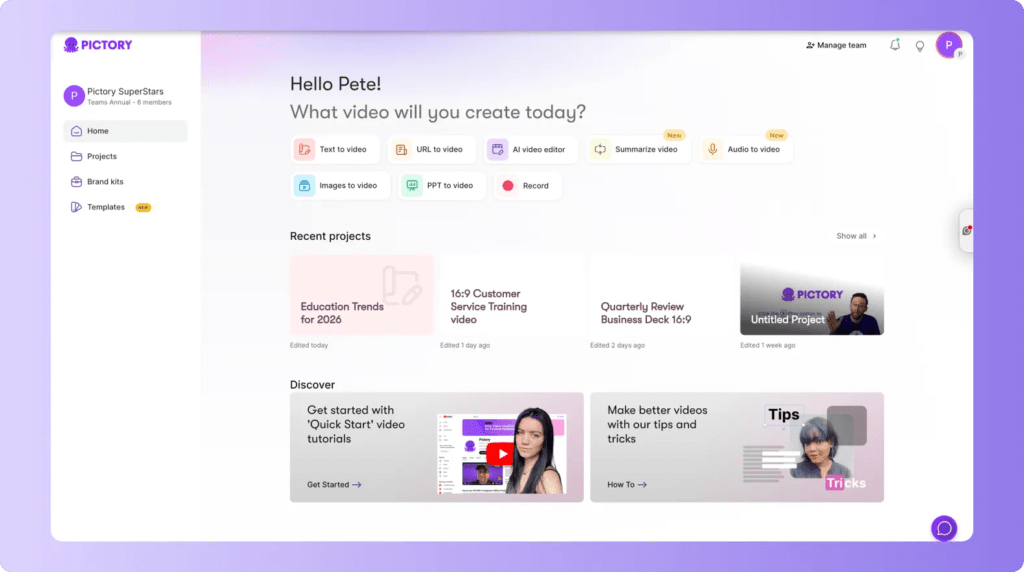
Script to Video
Paste any text or script, and Pictory AI automatically matches it with relevant stock video clips from its library. The AI analyzes your content and attempts to find visuals that match the context. It works surprisingly well for general topics but struggles with niche or technical subjects.
Blog Post to Video
This is Pictory’s standout feature. Drop in a blog URL, and it pulls the text, breaks it into scenes, adds visuals, and creates a video summary. It’s perfect for repurposing existing content for YouTube Shorts, Instagram Reels, or LinkedIn.
Auto-Captions and Subtitles
Every video gets automatic captions. They’re accurate (around 95% in my testing) and customizable. Given that 85% of social media videos are watched without sound, this feature alone adds serious value.
AI Voiceover
Choose from various AI voices in different accents and languages. The voices sound decent—not perfect, but good enough for most marketing videos. You can also upload your own voiceover if you prefer.
Video Editing Using Text
Edit your video by editing the text transcript. Delete a sentence, and the corresponding video clip disappears. It’s intuitive and much faster than timeline-based editing.
Automatic Video Highlights
Upload a long video (like a webinar or podcast), and Pictory can pull out short highlight clips automatically. This feature is hit-or-miss sometimes it nails the best moments, other times it picks random segments.
Brand Customization
Add your logo, choose brand colors, and create templates. Once set up, all your videos maintain consistent branding, which is crucial for businesses.
My Experience Testing Pictory AI
I tested Pictory AI by creating five different types of videos:
- A 60-second social media video from a blog post
- A product explainer from a script
- Short clips from a 20-minute podcast recording
- A LinkedIn video summarizing a case study
- A YouTube Short from article content
What worked well:
The blog-to-video conversion genuinely impressed me. I pasted a 1,200-word article about productivity tools, and within three minutes, Pictory created a 45-second video with relevant stock footage, captions, and background music. Did it need tweaking? Yes. But it gave me a solid first draft that would’ve taken an hour to create manually.
The caption accuracy was excellent. I spotted maybe two or three errors across all five videos.
The interface is clean and beginner-friendly. If you’ve ever felt overwhelmed by DaVinci Resolve or Premiere Pro, Pictory feels like a breath of fresh air.
What frustrated me:
The stock footage library is limited. After creating just a few videos, I started seeing the same clips repeatedly. For generic business content, you’ll be fine. For anything specific like SaaS product demos or niche hobbies you’ll struggle to find relevant visuals.
Customization has a ceiling. You can adjust colors, fonts, and basic layouts, but you can’t move elements freely or create complex animations. If you have a specific vision, Pictory will feel restrictive.
The AI sometimes mismatches footage with context. I wrote about “financial freedom,” and it showed someone literally holding cash. Subtle? No. You’ll spend time manually swapping clips.
Export times can be slow, especially for longer videos or during peak hours.
Pros and Cons
Pros:
- Fast content repurposing – Turn blogs into videos in under 5 minutes
- No learning curve – Genuinely easy for complete beginners
- Auto-captions work reliably – Better than most competitors
- Cloud-based – Works on any device, no downloads needed
- Regular updates – The team actively adds features based on feedback
Cons:
- Limited stock footage variety – Repetitive clips after extended use
- Generic video style – Output looks similar across all users
- Expensive for casual users – Pricing adds up if you’re making just a few videos monthly
- AI voice quality varies – Some voices sound robotic or unnatural
- No native social media posting – You’ll still need to upload manually
Use Cases
Content Marketing Teams: Repurpose blog content into social media videos without hiring a video editor. Create 10-15 short videos from existing articles every week.
Course Creators: Turn course outlines or lesson scripts into promotional videos or module intros. Add branded captions to increase completion rates.
Social Media Managers: Quickly create LinkedIn videos, Instagram Reels, and TikToks from company announcements, case studies, or thought leadership posts.
Podcasters: Extract 30-60 second highlight clips from episodes for promotion. Add captions and branding automatically.
Who Should Use Pictory AI
Ideal for:
- Bloggers who want to expand into video without appearing on camera
- Marketing teams producing high volumes of social content
- Coaches and consultants repurposing written content
- Agencies managing multiple client accounts
- Anyone who values speed over pixel-perfect customization
Not ideal for:
- Professional video editors who need advanced control
- Creators making highly stylized or artistic videos
- People with extremely niche content that requires specific footage
- Brands requiring unique, custom animations
- Anyone expecting Hollywood-quality output
Pricing
Pictory AI offers three main plans:
Standard Plan: $23/month (billed annually)
- 30 videos per month
- 10 minutes per video
- Basic features and templates
Premium Plan: $47/month (billed annually)
- 60 videos per month
- 20 minutes per video
- Premium stock footage
- Full music library access
Teams Plan: $119/month (billed annually)
- 90 videos per month
- Unlimited users
- Priority support
- API access
Free trial: Yes, 3 video credits with watermarks
Value for money opinion:
If you’re creating 15+ videos monthly, the Standard plan pays for itself compared to hiring freelancers ($50-100 per video). But if you’re only making 2-3 videos a month, it feels expensive.
The annual billing gives you roughly 20% savings, but there’s no monthly option for Premium or Teams plans anymore.
Competitor Comparison
Pictory AI vs Synthesia
Price: Pictory starts at $23/month; Synthesia at $29/month
Ease of use: Both are beginner-friendly, but Pictory is slightly simpler
Output quality: Synthesia offers AI avatars (digital humans), while Pictory focuses on stock footage and text overlays
Recommendation: Choose Synthesia if you want AI presenters. Choose Pictory if you’re repurposing written content.
Pictory AI vs Descript
Price: Similar pricing, but Descript offers more features beyond video creation
Ease of use: Pictory is easier for pure beginners; Descript has more functionality but steeper learning curve
Output quality: Descript offers superior audio editing and transcription; Pictory is better for quick social videos
Recommendation: Descript is better for podcasters and long-form content. Pictory wins for quick social media videos.
Pictory AI vs InVideo
Price: InVideo starts at $15/month, making it cheaper
Ease of use: Pictory is cleaner; InVideo can feel cluttered
Output quality: InVideo offers more templates and customization; Pictory is more automated
Recommendation: InVideo if you want more creative control. Pictory if you want speed and simplicity.
Alternatives
Lumen5 – Similar blog-to-video functionality with a free plan option. Less polished interface but decent for beginners.
Synthesia – Best if you need AI avatar presenters instead of stock footage. More expensive but more professional-looking for corporate videos.
Descript – Better all-around content creation tool if you also need podcast editing, transcription, and screen recording beyond just video creation.
Final Verdict
Pictory AI isn’t revolutionary, but it’s genuinely useful if you fit its use case.
It won’t replace a skilled video editor, and it won’t give you blockbuster-quality content. But if you’re drowning in written content and need to expand into video without learning complex software, Pictory delivers.
The sweet spot is content marketers and creators producing 15+ short videos monthly. For them, it’s absolutely worth it.
For everyone else? Try the free trial first. You’ll know within 10 minutes if it fits your workflow.
Final Rating: 7.8/10
Worth it? Yes, for high-volume content repurposing. Not worth it for occasional video creators or those needing advanced customization.
Try Pictory AI Free
Ready to test it yourself? Start with Pictory AI’s free trial and create 3 videos without a credit card.
FAQs
Is Pictory AI worth it?
Pictory AI is worth it if you’re creating at least 10-15 videos per month from existing written content. The time savings justify the cost for content marketers, agencies, and active creators. For occasional use (2-3 videos monthly), the pricing doesn’t make sense consider pay-per-video alternatives instead.
Can I use Pictory AI for free?
Pictory AI offers a free trial with 3 video credits. Videos created on the free plan include watermarks. There’s no permanent free plan, so you’ll need to subscribe after using your trial credits.
Pictory AI vs Synthesia: Which is better?
Pictory AI is better for repurposing blog content and creating stock footage-based videos. Synthesia is better if you want AI avatar presenters for corporate training or explainer videos. Pictory is simpler and faster; Synthesia looks more professional for formal content.
Does Pictory AI have good voiceovers?
Pictory’s AI voiceovers are decent but not exceptional. They sound slightly robotic compared to tools like Murf AI or Eleven Labs. For social media videos, they’re acceptable. For professional presentations, consider recording your own voice or using Pictory’s upload feature.
What video length can Pictory AI create?
Pictory AI’s video length depends on your plan. The Standard plan allows up to 10 minutes per video, while Premium extends to 20 minutes. Most users create 30-90 second social media clips, where Pictory performs best.