You sign up for a free AI writing tool, generate three paragraphs, and then hit a wall: “You’ve reached your daily limit.” Sound familiar? Millions of people are stuck in this exact loop, constantly bumping against the ceiling of free AI tools while wondering whether paying $20/month is actually justified. Choosing between free vs. paid AI tools isn’t just about budget. It’s about understanding what each tier actually gives you and what it quietly takes away.
Free AI tools offer basic functionality with usage caps, watermarks, or feature restrictions, while paid plans remove those limits and add priority access, advanced outputs, and better reliability. For casual users, free plans are often enough. Professionals and frequent users typically get better value and productivity from paid subscriptions starting around $10–$20 per month.
This guide gives you a framework to make that decision once so you stop second-guessing every time a free trial expires.
Using this tool? Got questions?
Ask me anything on Telegram - free honest answers before you spend your money.
What’s the Real Difference Between Free and Paid AI Tools?
Most people assume paid AI tools just do everything better. That’s not quite right.
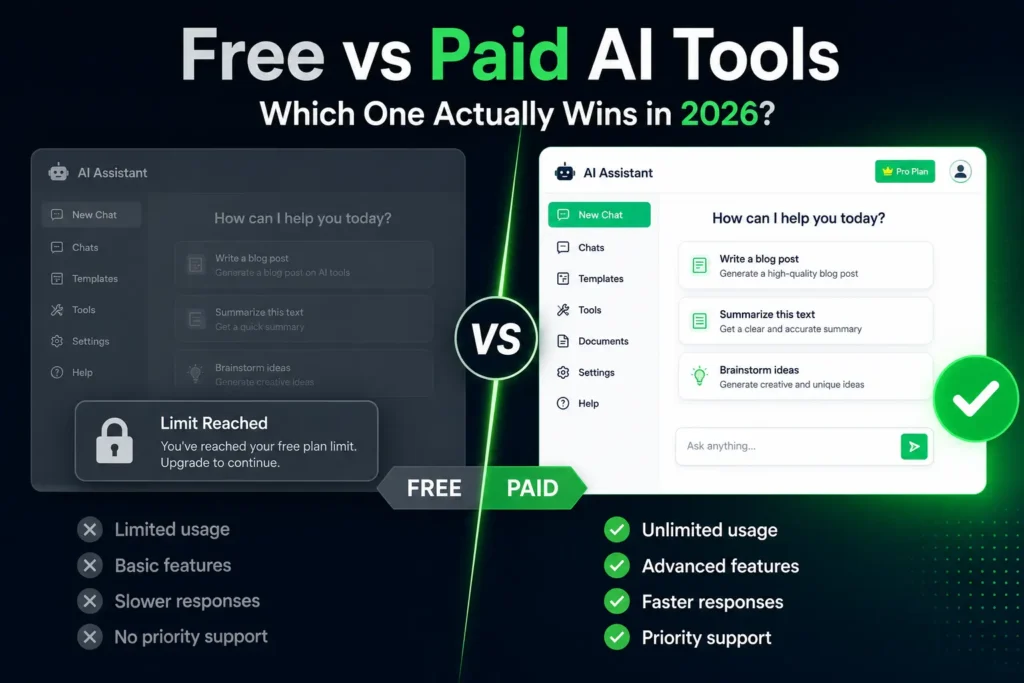
The gap between free and paid isn’t always about quality; it’s about access, volume, and consistency. When you’re on a free plan, the AI model powering the tool is often identical. What changes is how much you can use it, how fast you get responses, and which features are locked behind a paywall.
ChatGPT’s free tier uses GPT-4o with limits. ChatGPT Plus ($20/month) gives you faster responses, more messages per hour, access to newer models, and priority access during peak times. The underlying model quality? Often comparable on a single task. The difference shows up at scale and under pressure.
Free plans typically restrict:
- Number of messages, words, or generations per day or month
- Access to the most capable model version
- Speed (free users are deprioritized during high traffic)
- Export quality (watermarks on images, plain text only for documents)
- Advanced features like API access, longer context windows, or custom workflows
Paid plans typically unlock:
- Higher or unlimited usage quotas
- Priority server access
- Advanced model versions
- Team collaboration features
- Integrations with other software (Zapier, Notion, Google Docs, and more)
After reviewing over 40 AI tools across writing, design, coding, and research categories, one pattern stands out: free plans are genuinely useful for light, irregular use. The moment you need AI as a consistent part of your daily workflow in 2026, the limitations start costing you more than the subscription would.
Where Free AI Tools Actually Fall Short
Free isn’t always free. There’s a hidden cost most comparison articles don’t talk about: your time.
When I tested Grammarly’s free plan against Premium for a full week of content editing, the free version flagged basic errors but consistently missed tone issues, passive voice patterns, and readability problems that Premium caught instantly. The output wasn’t unusable, but fixing what Grammarly missed manually added roughly 20–30 minutes per article.
That’s the real math. If your time is worth ₹500–₹1000/hour, a free tool that creates an extra hour of manual work per week costs more than a $10/month upgrade would.
Common free-tier frustrations worth knowing:
- Usage caps that reset at inconvenient times. Many free plans reset daily, meaning one productive morning can burn your entire quota before noon
- Inconsistent output quality: free tiers often use older model versions or lower inference quality during peak hours
- No memory or context-free plans on tools like ChatGPT don’t retain previous conversations, so you re-explain context every session
- Watermarks and branding image generators like Adobe Firefly’s free tier and some video tools add visible watermarks that make outputs unprofessional
- No priority support if the tool breaks during a deadline; free users wait
One honest downside worth naming: even paid AI tools have significant limitations. They hallucinate, produce mediocre first drafts, and fail on niche or highly technical topics. Paying doesn’t buy you perfection; it buys you reliability and volume.
What You Get When You Pay and What You Don’t
Paid AI tool subscriptions sit in three rough price bands in 2026:
Budget tier ($5–$15/month): Tools like Claude’s lower-tier access, Canva Pro, or Writesonic’s starter plan. You get meaningfully more usage, fewer interruptions, and usually a better model version. Good for solo creators and students.
Mid-tier ($20–$30/month): ChatGPT Plus, Jasper’s starter, Grammarly Premium, Midjourney Basic. At this level, you’re paying for professional-grade volume. If you’re producing content, running client work, or using AI daily, this range typically pays for itself within days.
Professional/Team tier ($50+/month): Designed for agencies, developers, or teams. Includes API access, bulk processing, team seats, and advanced customization. Not relevant for individuals unless AI is central to your revenue.
When I ran a cost-benefit comparison across five tools for a mid-volume content creator producing 10–15 pieces of content per month, paid plans at the $20 tier consistently delivered a positive ROI not because the AI was dramatically better, but because removing friction from the workflow compounded into hours saved every week.
What paid plans don’t give you: guaranteed accuracy, original thinking, or a substitute for domain expertise. The AI still needs you to evaluate its output.
The AI Budget Decision Matrix: 3 Questions That Settle It
Stop guessing. Answer these three questions honestly, and your answer becomes obvious.
How often do you use AI tools each week?
- Less than 3 times a week → Free is probably fine
- 3–7 times a week → You’re in the upgrade zone; evaluate the specific tool’s limits
- Daily or multiple times daily → Paid is almost certainly worth it
Is AI part of something you earn money from?
- No (personal use, learning, curiosity) → Free plans are a rational choice
- Sometimes (side projects, occasional client work) → A budget paid plan ($5–$15) is worth testing
- Yes (client work, content business, job tasks) → Treat a paid AI subscription like any other professional tool expense
Have you hit the free plan’s limits in the last 30 days?
- Never → Stay free; you’re not using it enough to justify the cost
- Once or twice → Check whether limits align with your growth trajectory
- Regularly → You’ve already answered your own question
If two or more answers point toward paid, upgrade. If two or more point toward free, stay free but optimize how you use the free plan (more on that below).
This isn’t a complex decision. Most people overcomplicate it because they’re not clear on how often they actually use AI tools. Track it for one week. The pattern will tell you what to do.
Free vs Paid by Use Case: A Direct Comparison
Different users hit the ceiling at very different points.
Students and learners: Free plans from ChatGPT, Claude, and Perplexity cover most academic use cases summarizing papers, drafting outlines, and explaining concepts. The free tiers for these tools are genuinely generous in 2026. Most students don’t need to pay.
Freelance writers and content creators: This is where free tools start to crack. Daily content production burns through free quotas fast. A tool like Writesonic or Jasper on a free plan might cover 3–4 short articles per week; beyond that, you’re fighting limits. Paid plans in the $20 range are almost universally justified here. For a full breakdown by platform, see the best AI tools for content creators.
Small business owners: Depends heavily on use. Using AI for social media captions twice a week? Free works. Using it for email sequences, product descriptions, customer support drafts, and marketing copy simultaneously? A mid-tier paid plan ($20–$30) is the pragmatic choice.
Designers and visual creators: Canva’s free plan is excellent for casual use. Canva Pro ($13/month) becomes relevant when you need AI background removal at volume, premium templates, or brand kit features. Midjourney requires a paid plan ($10/month minimum) to generate images at all; there’s no meaningful free tier in 2026.
Developers: Free tiers from OpenAI, Anthropic, and Google (Gemini) cover early experimentation. The moment you’re building anything production-ready, you need API access, which means paid, usage-based pricing.
Is ChatGPT Plus Worth It? (And Other Paid Plans Worth Examining)
ChatGPT Plus is the most-asked-about paid AI subscription right now, so it deserves a direct answer.
ChatGPT Plus ($20/month): Worth it if you use ChatGPT daily and need faster responses, access to GPT-4o at higher volumes, image generation, and advanced data analysis. Not worth it if you use ChatGPT occasionally; the free tier handles moderate use well.
Claude Pro ($20/month, Anthropic): The strongest option for long-document work. Claude handles much larger context windows than most tools, meaning it can read and analyze full PDFs, long articles, or codebases in a single session. According to Anthropic’s documentation, Claude Pro offers at least 5x more usage than the free plan. Worth it for researchers, writers, and analysts.
Grammarly Premium ($12–$15/month): Justified for anyone producing professional written content regularly. The tone, clarity, and engagement suggestions in Premium go far beyond free spell-checking.
Perplexity Pro ($20/month): Strong for research-heavy users. The Pro plan adds multiple advanced AI models to searches, plus file uploads and more daily queries. Free Perplexity is already one of the best research tools available. Pro is for power users hitting daily limits.
In my experience testing these tools over extended periods, the clearest free-to-paid ROI comes from ChatGPT Plus (daily users), Grammarly Premium (content professionals), and Canva Pro (designers who need volume). Free plans that genuinely hold their own include Claude’s free tier, Perplexity’s free search, and Google Gemini’s free access.
How to Get the Most Out of Free AI Tools (Before You Pay)
If you’re not ready to upgrade yet, these approaches will meaningfully extend how far free plans take you.
Rotate across tools strategically. ChatGPT, Claude, Gemini, and Perplexity all offer free tiers. Using them in combination means you rarely hit a single limit hard. This isn’t a permanent solution, but it works well for irregular use.
Front-load your usage. If a tool resets daily, use it first thing in the morning before burning quota on casual queries. Save the free credits for tasks that matter.
Write better prompts. The most underrated leverage on any AI tool free or paid is prompt quality. A well-structured prompt on a free plan often outperforms a lazy prompt on a paid one. Being specific about format, length, tone, and context dramatically improves output without costing a single extra token.
Use free trials deliberately. Most paid AI tools offer 7–14 day free trials. Instead of testing casually, use trial periods to run actual work tasks through the tool. That’s the only honest way to evaluate whether the paid plan earns its cost for your specific situation. For a deeper look at tools that deliver real results at zero cost, the guide to free AI writing tools for beginners covers the best options across categories worth reading before committing to any paid plan.
FAQ
For light professional use, occasional drafting, quick research, or idea generation, free AI tools are often sufficient. The gap shows up with volume and consistency. Professionals producing daily content, running client campaigns, or relying on AI for core deliverables will hit free-tier limits in ways that consistently slow down their workflow.
Free AI tools and paid plans often run the same underlying model, but paid plans remove usage caps, give priority server access, unlock advanced features, and include newer model versions. The core quality difference is smaller than most expect. Reliability, volume, and workflow integration are where paid plans genuinely pull ahead.
ChatGPT Plus is worth it if you use ChatGPT daily and need consistent access during peak hours, image generation, or advanced data analysis. If you use it two or three times a week for basic tasks, the free tier handles most of that without the $20/month cost. Your usage frequency is the deciding factor.
Paid plans don’t automatically produce better content than free tiers. The same AI model often powers both. What paid plans deliver is more reliable output at higher volume without hitting daily limits mid-project. Content quality depends more on how you prompt the tool than whether you’re on a free or paid plan.
This is a common concern, but the reality is more nuanced. Most major AI tools, including free tiers of ChatGPT, Claude, and Gemini, use conversation data to improve models unless you opt out. This applies to both free and paid plans in many cases. Paying doesn’t automatically guarantee data privacy; check each tool’s privacy policy and opt-out settings regardless of tier.
Making the Call: Free or Paid?
The free vs paid AI tools decision comes down to one honest question: is AI a daily part of how you work or earn? If yes, the math almost always favors a paid plan in the $10–$20 range in 2026. If not, free tiers from ChatGPT, Claude, and Perplexity are genuinely capable, and the money is better saved until your usage justifies the upgrade.
Run the AI Budget Decision Matrix from this article on your own workflow. It takes three minutes and cuts through every feature comparison you’d otherwise spend hours reading.
The best AI tool isn’t the most expensive one. It’s the one that fits your actual work pattern; start there, and upgrade deliberately when the limits start costing you more than the subscription would. For specific tool recommendations that won’t break the budget, the breakdown of AI tools under $10 per month covers the best-value paid options without committing to premium pricing.